In WSO2 Identity Server, you can lock user accounts when they are created, and unlock later. For this feature to work, in each userstore, a user attribute should be mapped to "http://wso2.org/claims/identity/accountLocked" claim. In identity server, this claim is already mapped to "accountLock" attribute in embedded LDAP userstore. So you only have to follow below steps to enable "Account locking on creation" feature.
For Primary Userstore
1) Enable Identity Management Listener in <IS_HOME>/repository/conf/identity/identity.xml
<EventListener type="org.wso2.carbon.user.core.listener.UserOperationEventListener" name="org.wso2.carbon.identity.mgt.IdentityMgtEventListener" orderId="50" enable="true"/>
<EventListener type="org.wso2.carbon.user.core.listener.UserOperationEventListener" name="org.wso2.carbon.identity.mgt.IdentityMgtEventListener" orderId="50" enable="true"/>
2) Do the following configurations in the
<IS_HOME>/repository/conf/identity/identity-mgt.properties file.
Authentication.Policy.Enable=true
3) If you want to see if an account is locked or not in user profile, you can set "http://wso2.org/claims/identity/accountLocked" claim "Supported By Default", by ticking it in Claim management UI > http://wso2.org/claims > Account Locked > Edit like this.
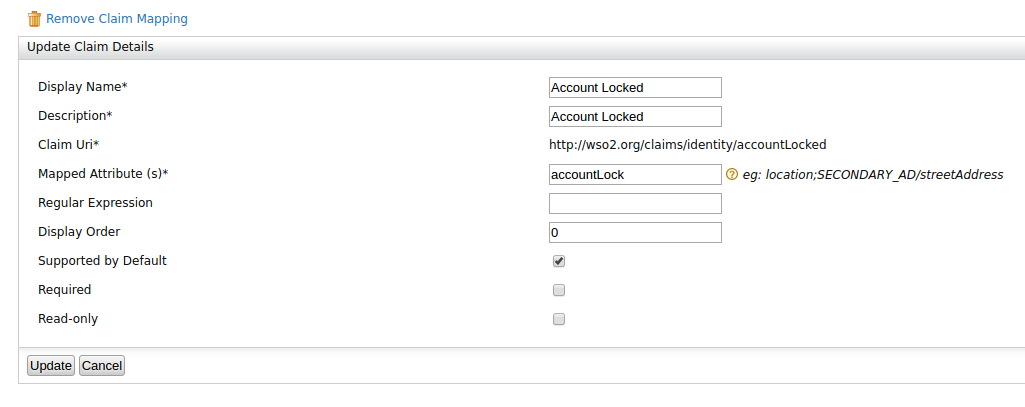
Then you'll see it in your profile like this.

For a Secondary Userstore
Now, let's try the same with a Secondary userstore. Say you have already added a Secondary Userstore with domain "WSO2". Now we need to map a user attribute from that userstore to http://wso2.org/claims/identity/accountLocked claim.
Let's say we map above claim to an attribute named "locked" in your secondary userstore. You can map it like this.

After doing that, user accounts in secondary userstore will also be locked once they are created.
That's all. Feel free to ask related questions below.


